 LiveSub
A flat 1-second timeout failed us: budgets for in-browser translation
Published: 2026-11-15
Works in Chrome or Edge on a computer (Firefox: through a microphone or audio input; the add-on covers YouTube and Twitch; not on phones). Japanese ⇄ English only.
Every service that runs a translation model inside the browser hits the same wall. GPUs vary from machine to machine, sentences vary in length, the model is large and slow to download, and the screen can never freeze while all of this happens.
This post is how LiveSub (a web app that turns the audio playing in a browser tab into live subtitles and translations) rebuilt its "too slow, fall back" rule for local translation from production data. LiveSub is built for live streams watched in the browser. Everything below, from never stopping the subtitles to timing decisions by the rhythm of speech, assumes a live stream. We give the shape of the formulas only. The coefficients are something you measure on your own users.
1. The problem
1.1 Two engines, so subtitles never stop
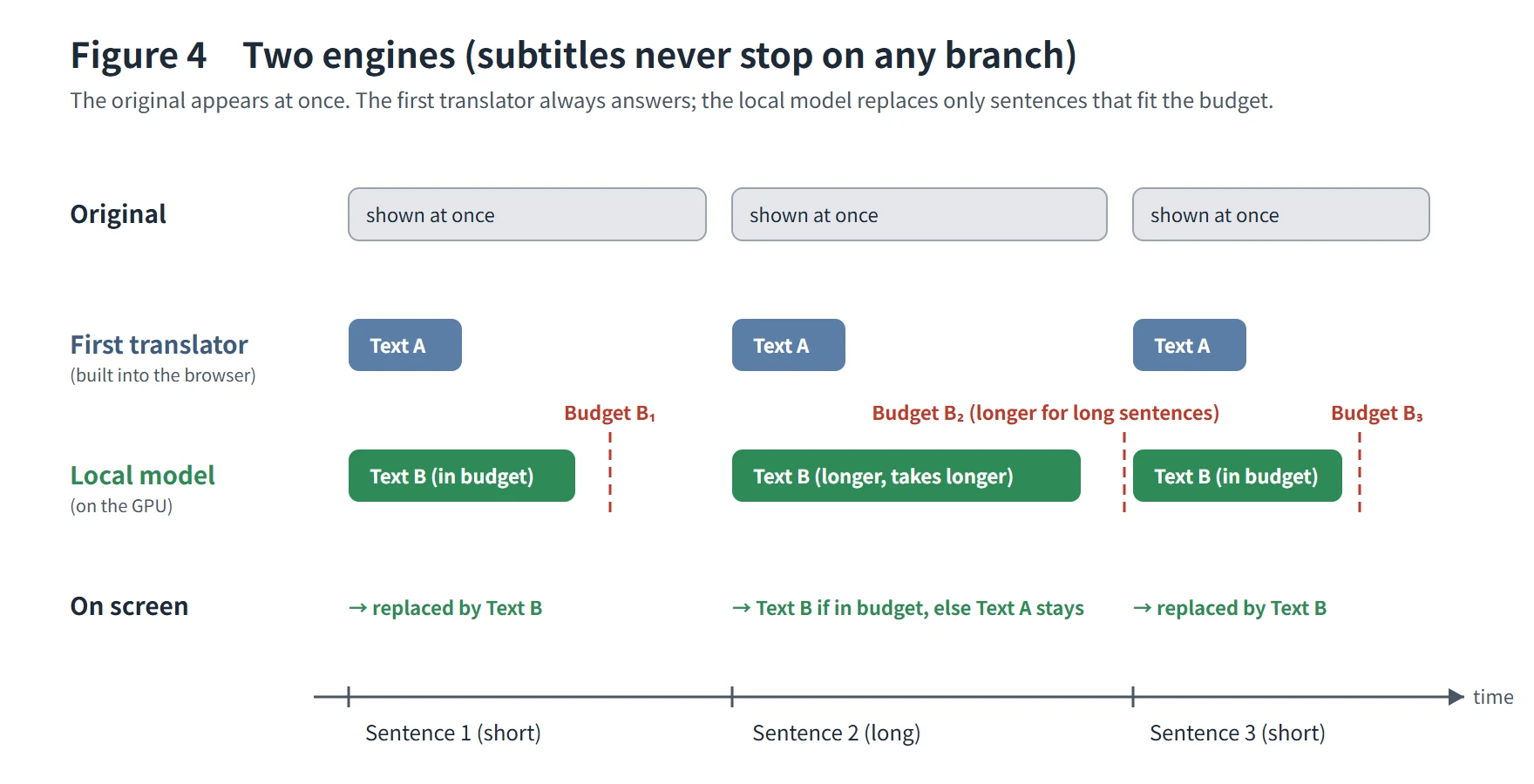
Translation in LiveSub runs on two engines. The translator built into the browser (Chrome's on-device Translator API) produces subtitles first. On computers with a capable GPU, a local translation model that gives more natural output is loaded in the background. When it is ready, LiveSub switches over between sentences. The local model is PLaMo 3 Translate 0.8B by Preferred Networks, Inc. (Built with PLaMo).
After the switch, the original text still appears at once. Each sentence is sent to both engines at the same time. If the local model answers within its budget, its translation is shown; if not, the first translator's text is shown (Figure 4 in 3.1). A sentence that arrives while the local model is still busy with the previous one gets the first translator's text without waiting. On every branch, the subtitles keep moving.
1.2 Start light, then step up as the device allows
The two engines are part of a larger ladder. LiveSub starts in the form that keeps a first-time visitor waiting the least, then steps up as far as the device can handle. A live stream does not wait, so subtitles come first and quality comes after.
| Step | Speech recognition | Translation |
|---|---|---|
| 1. First visit | Light (English about 120MB, Japanese about 206MB) | Built-in browser translator |
| 2. Balanced | Balanced (English about 400MB, Japanese about 670MB) | Built-in browser translator |
| 3. If the GPU is strong enough | Balanced (running on the GPU) | Local model (PLaMo 3 Translate, about 570MB) |
- 1 → 2: The Balanced recognizer is downloaded in the background while the Light one is producing subtitles, and swapped in when subtitles are stopped. From the second visit on, LiveSub starts on Balanced. On a 50Mbps line in our own test, the time to the first subtitle went from 94.7 seconds to 41 seconds
- 2 → 3: Only when recognition runs on the GPU and the GPU supports 16-bit floating point (shader-f16) is the local model loaded in the background. It takes over between sentences once ready. On a visit that started on Light, the local model starts downloading only after the Balanced recognizer is in place
- The way down: if recognition cannot keep up, LiveSub switches to a lighter recognizer. If the local model cannot keep up, it falls back to the built-in translator
Subtitles never stop at any step. This post is about step 3: once we step up, when do we step down, and when do we step back up?
1.3 It never stops, so it fails silently
Because nothing stops, a wrong decision costs the user good translations without them noticing. The subtitles keep coming, so all they see is "the translation got a bit stiffer." Unless you count fallbacks, you will not notice either.
Here is where we started (Figure 1).
- Of the sessions that used translation, only about a third used the local model to the end
- Most fallbacks did not come from broken devices or extremely slow GPUs, but from everyday moments in a stream
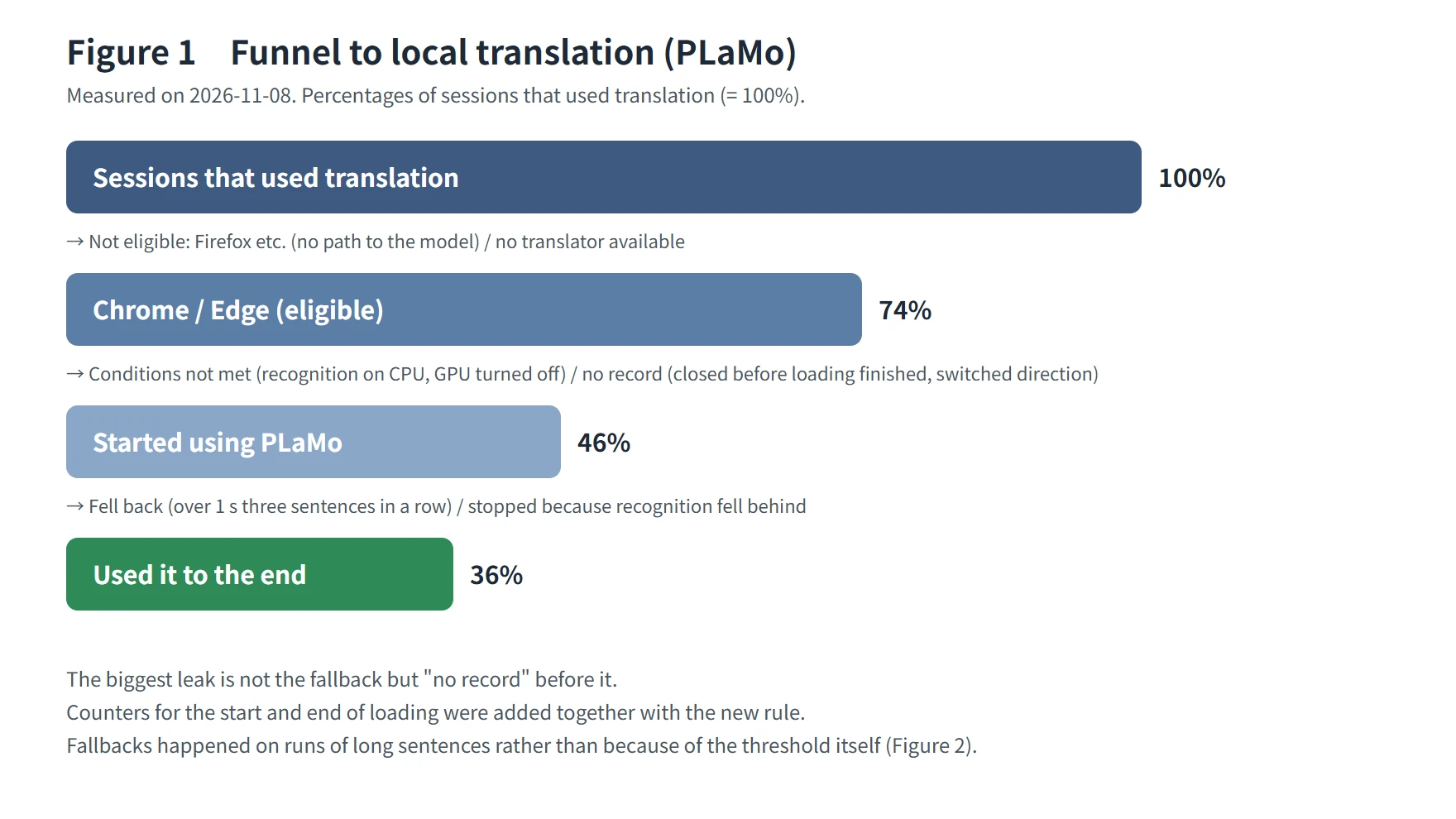
The biggest leak is not the fallback but the step before it: sessions that closed before loading finished. That is a download speed problem, and we treat it separately. This post is about the last step: a rule that, once it fell back, never came back.
2. Why a flat timeout fails
2.1 Time grows with sentence length
The first rule was simple. If translating a sentence took longer than a fixed time (1 second), that sentence used the first translator's text, and if that kept happening, the local model was dropped for the rest of the session.
The trouble is that inference time grows with sentence length. Language model inference has two phases: reading the whole input at once (prefill) and producing the output one token at a time (decode). The time for one sentence is a fixed cost for the input plus a cost for every output token. With a flat timeout, longer sentences are more likely to be counted as "slow" (Figure 2).
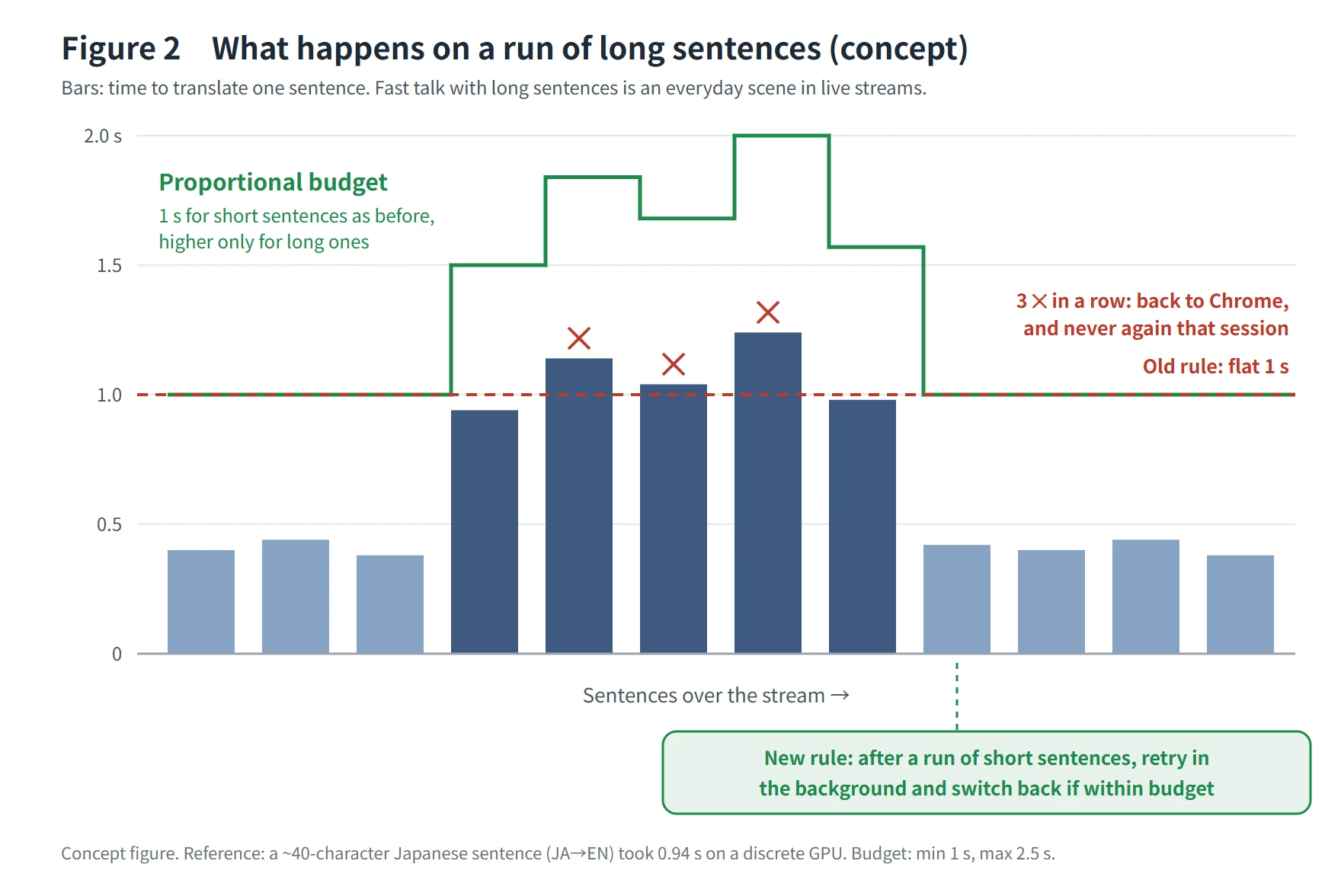
In our measurements, a Japanese sentence of about 40 characters used more than 90% of the 1-second line even on a discrete GPU. On an integrated GPU, sentences of ordinary length went over the line. Japanese to English takes longer than English to Japanese for the same number of characters, because each source character turns into several times as many output tokens. In short, the rule was catching "long sentences," not "slow devices."
2.2 Counting consecutive misses breaks on peaks
The rule had the form "fall back when the timeout is exceeded several times in a row." Live streams have peaks of fast talk with long sentences all the time. When things get exciting, sentences get longer and pauses get shorter. If every peak flips the switch and the session never flips back, the streams with the most peaks get the fewest good translations.
Counting consecutive misses cannot tell a streak of bad luck from a truly slow device. It is the same problem people run into when designing circuit breakers in distributed systems. The rule was not too strict. It was measuring the wrong thing.
3. The new rule
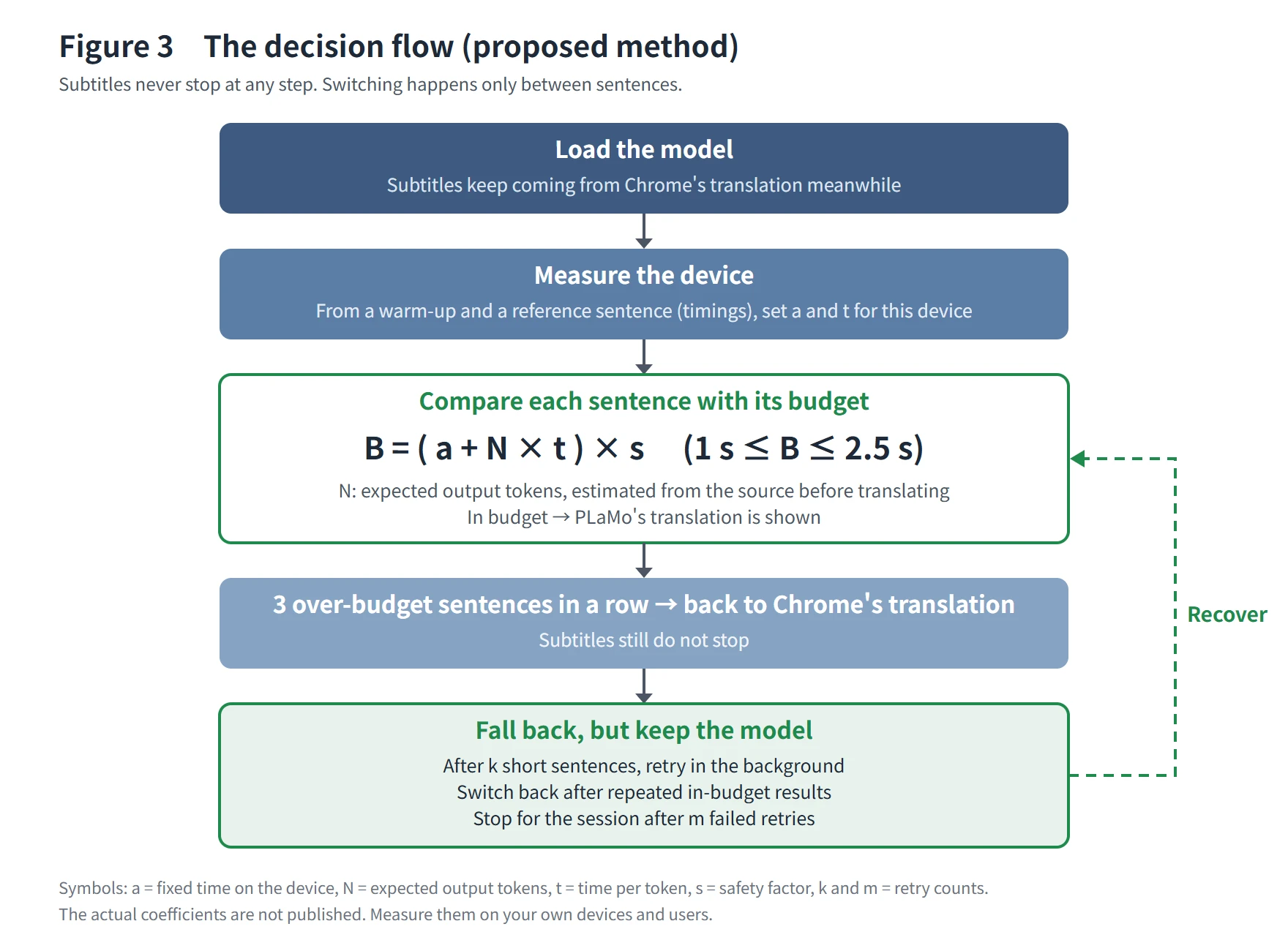
We changed three things (3.1 to 3.3). All of them work inside two constraints: subtitles never stop, and switching only happens between sentences (Figure 3). We also describe the measurements behind the rule (3.4) and how names are handled (3.5).
3.1 A budget proportional to length
The time we wait for each sentence (the budget B) is set per sentence.
B = ( a + N × t ) × s (1 s ≤ B ≤ 2.5 s)
- N: the expected number of output tokens. It has to be known before translating, so it is estimated from the length of the source text with a per-language ratio
- t: the time per output token on this device
- a: the fixed time for reading the input on this device
- s: a safety factor
- The 1-second floor is the old line, so short sentences never get less than before. The 2.5-second ceiling keeps the translation from drifting too far behind the original
Short sentences keep the old budget, and only long sentences get extra time in proportion to their length. "Slow" no longer depends on sentence length.
The 2.5-second ceiling comes from the screen. A subtitle is replaced when the next sentence arrives, so a translation that arrives later than that has nowhere to go. How long a subtitle stays on screen grows with the length of the original, so the ceiling stays within that range.
Why estimate the output length before translating? Because the budget has to be fixed when translation starts. Otherwise there is no moment to decide to show the first translator's text instead. If you only learn that a sentence was slow after it is done, its subtitle is already on screen. Estimating from the source length is rough, but it is enough to tell long sentences from short ones.
3.2 Calibrating per device
a and t are not shared across all devices. Right after loading the model, LiveSub translates a warm-up sentence and then a reference sentence, and sets a and t for this device and this session from the measured timings (input time, output tokens and output time).
The warm-up comes first because the first sentence on a GPU also pays for setup such as shader compilation. The reference sentence is an ordinary subtitle-length sentence, so the per-token time is stable.
GPU load differs from session to session, so nothing is saved; we measure every time. Measuring takes less than a second. If no measurement is available, we use a default slightly slower than a discrete GPU. Being lenient on a slow device is safer for the subtitles than being strict on a fast one.
Calibration has a side benefit. If you count the reference sentence's per-token time in speed bands (fast, medium, slow), you can see how your devices are spread across the bands. We count fallbacks by GPU vendor, so putting the two side by side shows whether fallbacks lean toward slow devices or also happen on fast ones.
3.3 Retrying: a way back
After three over-budget sentences in a row, LiveSub falls back to the first translator, but it does not throw the model away (the last step in Figure 3). After k short sentences in a row, the next sentence is also sent to the local model in the background. The subtitle still shows the first translator's text. If the background results keep fitting the budget, LiveSub switches back to the local model between sentences. After m over-budget retries, the local model is dropped for that session and released from the GPU. For speakers who rarely say short sentences, a time-based signal is also in place.
Retries run in the background so that a failed retry never makes the user wait. The subtitle is already showing the first translator's text, so a slow background result changes nothing on screen. Switching back requires several in-budget results in a row so that devices on the edge do not flip back and forth. Making it slightly harder to switch back than to fall back is hysteresis.
Short sentences are the signal because a retry on a short sentence is cheap, likely to succeed, and costs little if it fails. We retry in the valleys of speech (runs of short reactions) and not on the peaks (runs of long sentences). The rhythm of the stream itself becomes the signal.
This is a circuit breaker (closed, open, half-open) applied to a new setting. What is new is not the parts, but putting them together for live subtitles in the browser with two engines, and setting the coefficients from production measurements.
3.4 Measuring
Before changing the rule, we added measurements. For every sentence, we count input and output tokens and the time spent on each. For every session, we count whether loading started, whether model files were downloaded, whether it fell back, whether it came back, whether it stopped, and the speed band. The inference engine already returns token counts and timings, so all we added were counters.
If you move a threshold without measuring, you cannot tell whether things got better. Counting slow sentences and fallback sessions separately tells you whether the threshold is too strict or the device is too slow.
3.5 Word lists: carrying names from recognition to translation
What breaks most often in a stream are fixed names: people, game terms, product names. Recognition spells them differently every time, and translation treats them as ordinary words. LiveSub passes the words a user writes to both recognition and translation.
- Today's keywords (up to 3): names that come up again and again in this stream are given straight to the Balanced recognizer, so they are misheard less. They are not stored on the device
- Word list (one entry per line): recognized text is corrected to the spelling you entered. To avoid rewriting unrelated words, a match also requires the same first letter and a small length difference, not only similarity. Writing "Tanaka = たなか" also fixes how the name appears in the translation
- Packs by use: common words for streams, games, anime, meetings and more can be added in one click. Only words that do not rewrite a single sentence of ordinary text are included
- A page to make your own list: open it with "Make your own list (new tab)" in the word list section. You choose the original word, its type and the word you want in the translation, and the line is built for you without typing any symbols. "Try it on a real sentence" checks whether the real translation improves, and "Save as a file" turns the list into one text file
- Sharing: like a game mod, a list can be handed to other people who watch the same stream. They add it with "Add from file." The file is made and read only on your computer and is never sent to LiveSub's server (how-to: make and share a word list)
A name reaches the translation in three stages.
- Translate the sentence as it is. If the chosen spelling already appears in the translation, use it (the sentence stays natural)
- If not, and the local model is in use, translate again with the model's glossary field (only the name pairs found in that sentence). This translation also waits within the budget from 3.1 and is discarded if it is late
- If the name still does not appear, mark the name, translate, and replace the mark in the output with the chosen spelling
In our own comparison of 47 sentences, adding stage 2 kept the number of sentences where the name appeared as specified at 46. The sentences read more naturally in 9 cases and worse in 2 (judged by one reader). For example, the marker method gave "I got flanking ed again", and the glossary field gave "I got flanked again" (both are outputs of PLaMo 3 Translate).
The glossary field also runs within the proportional budget, so "never make subtitles wait" holds here too.
4. Results
Before (2026-11-08, per session, Figure 1):
- Of the sessions that used translation, 36% used the local model to the end
- Of the sessions that started using the local model, 20% fell back
- The devices that fell back were, as far as we could tell, integrated GPUs, and they fell back after exactly the minimum of three sentences
After (from the version released on the evening of 2026-11-09; the five full days from November 10 to 14):
| Before (Nov 8) | After (Nov 10 to 14) | |
|---|---|---|
| Eligible (first translator was Chrome's on-device translator) | 74% | 80% |
| Started using the local model | 46% | 40% |
| Used it to the end | 36% | 34% (32 to 38% per day) |
| Of sessions that started, fell back | 20% | 14% |
| Of sessions that fell back, came back | No way back | About a third |
| Slow sentences (over budget ÷ translated) | Not counted | 1.3% (381 / 30,081 sentences) |
The first three rows are percentages of sessions that used translation, as in Figure 1. We count sessions (one page load that started subtitles), not people. "Used it to the end" is sessions that started using the local model minus those that fell back and those stopped because subtitles fell behind. To compare with the earlier figure, sessions that came back are not added in.
Fallbacks went down from 20% to 14%, and slow sentences were 1.3% of translated sentences. On the other hand, the share that used the local model to the end went from 36% to 34%, roughly flat. The new rule only acts on the last step of the funnel, and the larger leak before it (getting to the point of using the local model) is still there (Figure 1).
Fallbacks were uneven by GPU vendor.
| GPU | Share of sessions that started | Of those, fell back |
|---|---|---|
| Nvidia | 43% | 3% |
| Intel (mostly integrated) | 29% | 32% |
| AMD | 18% | 19% |
| Apple | 9% | 0% |
About two thirds of the sessions that fell back were on Intel. The proportional budget is meant to stop fast devices from falling back on long sentences, and on Nvidia, where discrete GPUs are common, only 3% fell back.
By speed band (per-token time of the reference sentence, three bands), the sessions that started using the local model were 56% fast, 22% medium and 22% slow. We count fallbacks by GPU vendor, not by band.
In production, a sentence averaged 38.3 input tokens and 9.2 output tokens and took 507 milliseconds (from the totals over 30,081 translated sentences). From November 12, when we started counting them, to November 14, sentences that arrived while the previous one was still being translated, and so got the first translator's text without waiting, were 1.4% of translated sentences (310 / 21,605).
We also changed how the input is built along the way (from the morning of November 11, the previous sentence is passed as well). Input per sentence grew from about 23 to about 43 tokens, yet slow sentences went from 0.8% on November 10 (40 / 5,227) to 1.3% on November 12 to 14 (288 / 21,605), and fallbacks from 14% to 16%. Even with nearly twice the input, over-budget sentences stayed at 1 to 2% of translated sentences.
Totals since we started counting tokens and time per sentence (from the 2026-11-09 release to November 14, a few hundred sessions in all):
| Total | |
|---|---|
| Sentences translated by the local model | 30,346 |
| Input tokens | 1,157,385 |
| Output tokens | 280,687 |
| Time spent translating | 4 h 19 min (reading input 2 h 26 min, producing output 1 h 53 min) |
Tokens are the units the model counts. We do not record characters. The source length in characters is only used to estimate the budget before translating. Having length and time as a pair for every sentence is what this rule stands on. With time alone, you cannot tell a slow device from a long sentence. With more than 30,000 sentences, there is plenty of data to see how length and time relate sentence by sentence.
Having seen these numbers, we decided to leave the thresholds and coefficients as they are (2026-11-15).
Before release, we checked three scenarios locally. Nothing was played aloud; synthesized speech was fed inside the page.
| Scenario | Result |
|---|---|
| Japanese sentences of about 40 characters in quick succession (discrete GPU) | No over-budget sentences, no fallback |
| A slow device (each sentence artificially delayed) | Fell back after consecutive misses, every retry was over budget, and the local model was dropped for the session. Subtitles continued with the first translator |
| A device that speeds up right after falling back | Short-sentence retries succeeded in a row and it switched back to the local model |
Note: from this version on, "slow sentence" means "over the budget" instead of "over the flat line." Read the numbers before and after that point separately.
5. Discussion
5.1 Why it works for live streams
LiveSub's biggest strength is that it is built for live streams in the browser. A recorded video can be paused, but a live stream does not wait. That is why "never stop the subtitles" is the first constraint, and why we measure how many good translations we can deliver within it.
Live stream audio rarely goes silent, voices sit on top of background music, and speech has a rhythm of peaks and valleys. Long sentences cluster on the peaks, and short reactions cluster in the valleys. The old rule broke on the peaks and never came back. The proportional budget gets through the peaks, and retries bring the model back in the valleys. Using that rhythm itself as the retry signal is what makes this fit live subtitles.
5.2 What we did not do
- Changing "consecutive misses" to "a share of the last few sentences." Once the proportional budget fixes what "slow" means, we expected consecutive misses to hit only truly slow devices, and decided to look at the numbers first
- Switching to a lighter quantization of the model. There are reports that quantization does not always speed things up on GPUs in the browser, so we decided to measure on real devices first
- Extending to browsers outside the current scope. Without a first translator, the "never stop the subtitles" premise does not hold
5.3 Beyond this app
This problem is not unique to LiveSub. Any service that runs a local model in the browser inherits device differences, input lengths, large downloads and a screen that cannot freeze. Summarization and speech recognition have the same shape: time grows with input length, and device speed differs from session to session.
The approach generalizes in this order:
- Measure. Know from production data what processing time is proportional to, and how fast each device is
- Divide by what it is proportional to. Replace a flat timeout with expected size × the device's unit cost
- Calibrate per device. Do not share coefficients across devices; set them per session from measurements right after loading
- Build a way back. Pair every rule that gives up with a rule that tries again and returns. Retry in the background, trigger on low load, and cap the number of retries
6. Summary
We moved from "cut by time" to "divide by what time is proportional to, calibrate per device, and build a way back." All of it is shaped by the conditions of live streams in the browser.
The old rule was not a configuration mistake. A flat 1 second and 3 sentences were reasonable numbers for short sentences on fast devices. The problem was that those numbers measured sentence length, not device speed. When a rule feels too strict, check what the threshold is measuring before loosening it. That was the biggest lesson from this change.
The other lesson is to pair every rule that gives up with a way back. An automatic switch that cannot switch back loses the rest of the session to a single peak. The way back took nothing more than recasting the half-open state of a circuit breaker so that subtitles never stop.
The numbers are from LiveSub in production. The coefficients (the ratio from source characters to output tokens, the factor s, k, m, the interval of the fallback signal, and the default device baseline) are something each service has to measure on its own users. If you copy the shape of this approach, you still have to measure the numbers on your own devices and users. We think that is fine. If the measurements, the shape of the formula and the way back are shared, the next person to hit the same wall does not have to start from zero.
We will add newer numbers to this post as they come in.
Built with PLaMo. Local translation in LiveSub uses PLaMo 3 Translate 0.8B by Preferred Networks, Inc. under the PLaMo Community License Agreement (Japanese text).
About this guide: written by the maker of LiveSub. Steps, button names and figures are checked against the LiveSub app as of the date above. If something is wrong, please tell us through the contact page.