 LiveSub
How to watch Japanese VTuber streams with English subtitles (free, no install)
Published: 2026-09-09 ・ Updated: 2026-10-26
Works in Chrome or Edge on a computer (Firefox: through a microphone or audio input; not on phones). Japanese ⇄ English only.
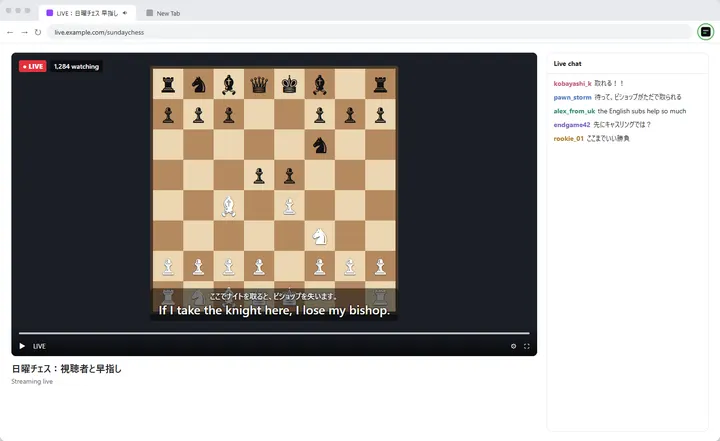
If you follow Japanese VTubers, you already know the problem. The stream is live, there are no subtitles, and the clips with translations show up days later, usually only for the parts someone decided were worth clipping.
Live translators are wonderful, but they cannot cover every stream, and they cannot cover yours at 3 AM.
This is a short guide to getting live English subtitles on any Japanese audio playing in your browser, for free, without installing anything.
What you'll learn
- How to get live English subtitles on a Japanese stream in a few steps
- How to read them while the stream is fullscreen
- How the word list helps with names, and where the limits are
In short: open the stream in Chrome or Edge on your computer, open LiveSub in another tab, choose Japanese → English, and share the stream's tab. Live English subtitles appear about one to two seconds behind the speaker. Names are the weak point, so add the ones you care about to the word list.
What you need and how it works
- Chrome or Microsoft Edge on a computer. In Firefox, LiveSub listens through a microphone or a loopback audio input (such as Windows Stereo Mix); on YouTube and Twitch, LiveSub for Firefox turns the video's audio into subtitles directly. Safari uses the same input method but is untested
- A computer. Phones cannot share tab audio, so this does not work on mobile
- A one-time download of the speech recognition model (about 590MB for the Balanced setting for Japanese)
That is it. No account, no extension, no payment.
Open LiveSub. It is a website, not an extension. You give it the audio from one browser tab. It recognises the speech on your own computer, translates it, and shows the subtitles.
Your audio is never uploaded anywhere; the recognition model runs inside your browser. That also means there is no per-minute limit, because nobody is paying for server time.
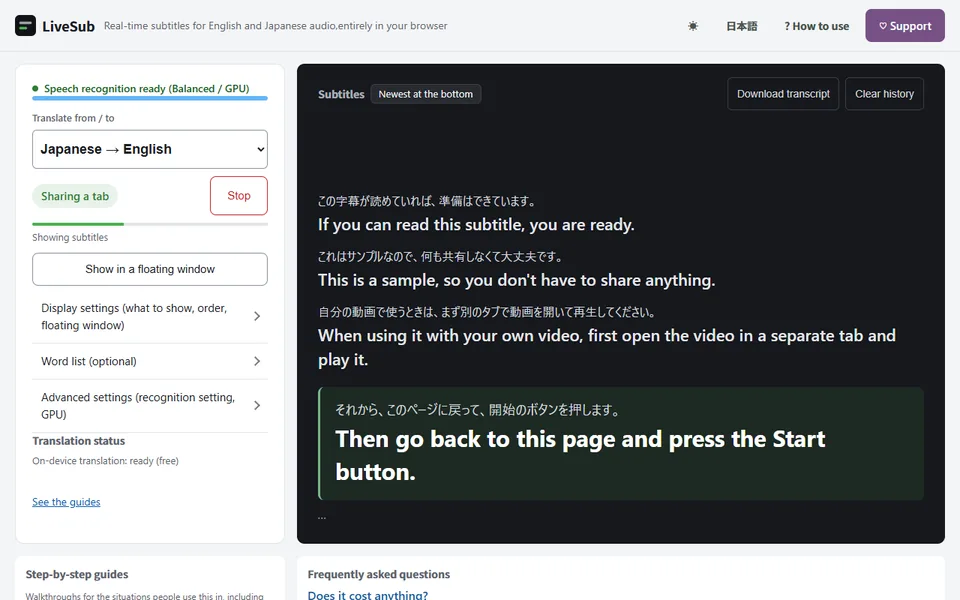
If you want to check it works before opening a stream, set "Japanese → English" and press "Try the how-to video (no sharing)". It plays a short how-to video and shows subtitles without sharing any tab, and it also gets the one-time download out of the way.
Step by step
- Open LiveSub in Chrome
- Under "Translate from / to", choose Japanese → English
- Under "Recognition setting", leave Balanced. If your computer has a powerful GPU, Japanese-tuned is a separate model trained only on Japanese and is noticeably more accurate, but it is heavy, and the first download is about 730MB
- Click "Start (share a tab)". The dialog opens right away; on the first run the model keeps downloading in the background and subtitles start once it is ready
- In the dialog Chrome shows you, pick the "Chrome Tab" section, choose the tab playing the stream, and turn on "Also share tab audio" at the bottom left
- Click Share
Subtitles start appearing about two seconds behind the audio.
Step 5 is the part everyone misses. If nothing appears, go back and check the audio checkbox.
Using Firefox? Firefox cannot share a tab's audio, so LiveSub listens through a microphone or an audio input instead. Open LiveSub in Firefox, play the video in another tab, and press "Start (mic or audio input)" on the LiveSub page. Allow microphone access when the browser asks. If your computer has a loopback input (such as Windows Stereo Mix), LiveSub picks it automatically; otherwise it listens through the microphone to the sound from your speakers (headphones will not work). There is no sharing dialog. On YouTube and Twitch, LiveSub for Firefox turns the video's audio into subtitles directly: press "Add to Firefox — it's free" to install it, play the video in another tab, and press "Start (YouTube / Twitch tab)"; the subtitles appear over the video.
Make it usable while watching
Click "Show in a floating window". The subtitles pop out into a small always-on-top window, so you can put the stream in fullscreen on one side and keep reading. This is the setting that turns it from a demo into something you actually use.
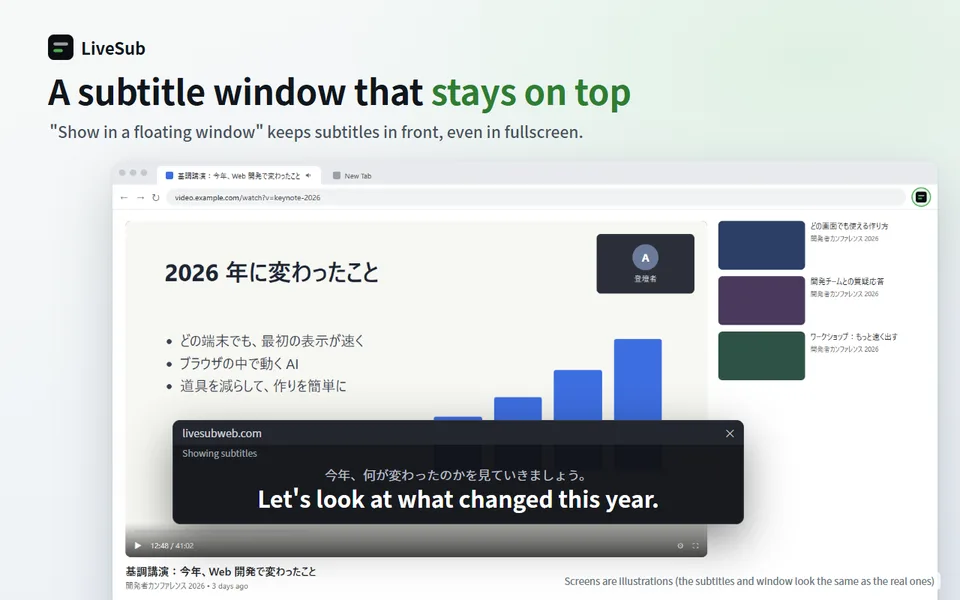
You can also switch between "Original and translation", "Translation only", and "Original only". If you are learning Japanese, keeping both is genuinely useful: you see the Japanese as you hear it.
Two features worth knowing about
The word list
Speech recognition is bad at names, and VTuber streams are full of them: character names, member names, in-joke vocabulary, game titles. Type the names into the word list, one per line, and they get corrected automatically.
It also fixes the hiragana/katakana mix-ups that recognition constantly gets wrong, so ミライ becomes みらい if that is how you wrote it. Spending two minutes adding the names you know will come up makes a real difference.
Transcript download
You can save the whole session as a timestamped text file with the Japanese and the English side by side. Useful if you want to write up a summary afterwards, or to go back and check something you missed.
Being honest about the limits
Better to know this before you try it than to be disappointed:
- Names are the weak point. Personal names, character names and place names come out wrong fairly often. The word list helps, but it is not perfect
- There is about a one to two second delay. This is not simultaneous interpretation
- Loud background music and overlapping voices reduce accuracy, which matters for gaming and singing streams
- It is machine translation. You will get the gist reliably; you will not get nuance, wordplay or jokes the way a human translator gives them. Please keep supporting the people who do that work
- Japanese-tuned needs a GPU and uses it hard; if your game or the stream itself starts stuttering, switch back to Balanced. You can switch models while the stream is running, and the subtitles do not stop
Why this exists
Most tools that do this either only work on one specific site (YouTube only, Netflix only), or they charge by the minute. One competitor charges around $9.90 for 120 minutes.
Because the recognition runs on your machine, there is no minute counter here, and no list of supported sites. If it makes sound in a browser tab, it can be subtitled.
Wrapping up
You do not have to wait for clips. Share the stream's tab with LiveSub, add the names you know will come up, and read along in the floating window.
Try it on the next stream you would otherwise have skipped. Open LiveSub on your computer and press "Try the how-to video (no sharing)" first.
About this guide: written by the maker of LiveSub. Steps, button names and figures are checked against the LiveSub app as of the date above. If something is wrong, please tell us through the contact page.